
4 min read
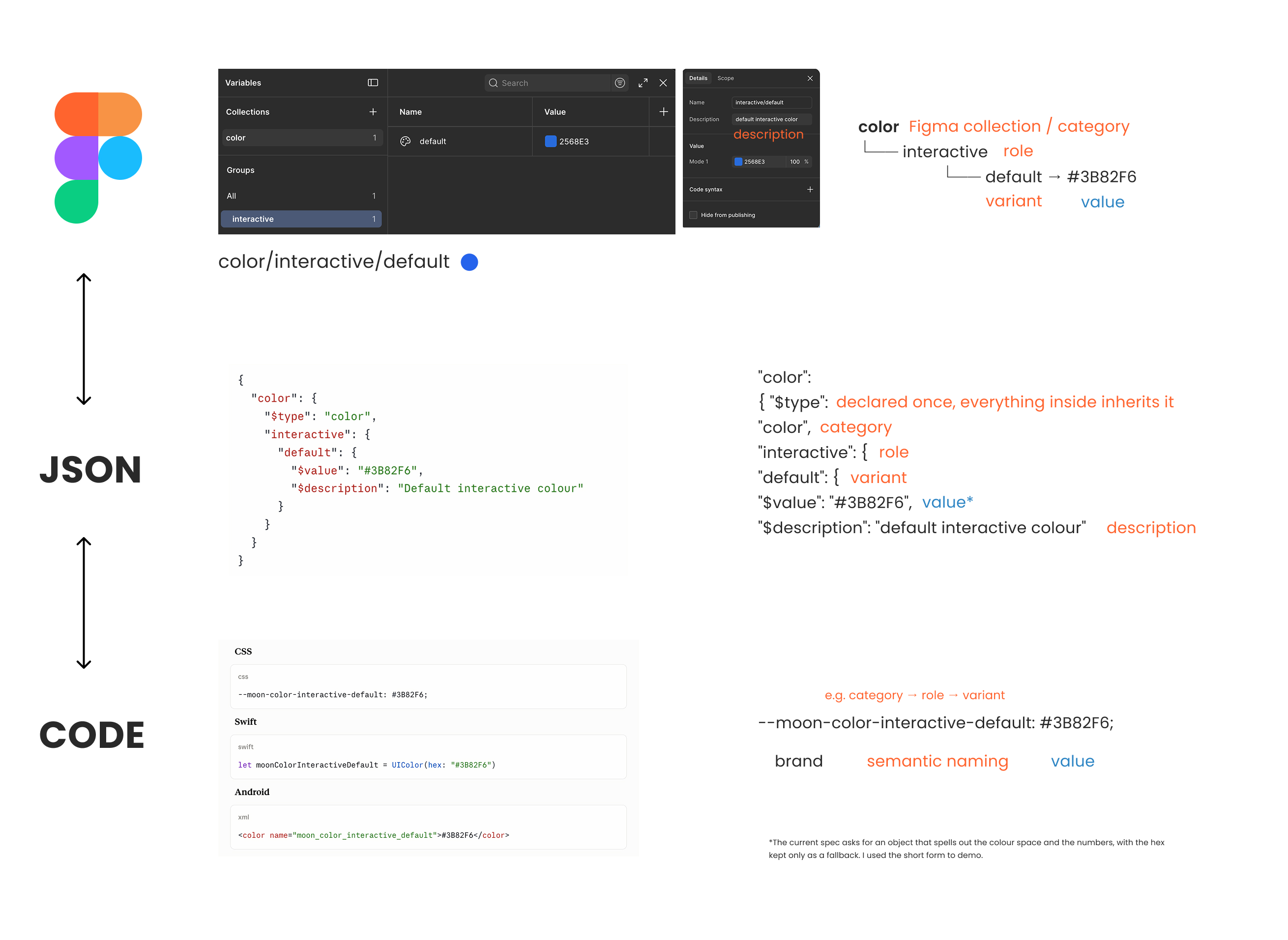
The same token, or Figma variable, has three spellings, and not one of them is a rename. Figma shows you color/interactive/default, the token file nests it as an object, and CSS joins it up with hyphens. Same path, different punctuation each time.
That sounds like a detail until somebody decides to tidy the names up. A rename is not housekeeping, it breaks the design file and the code in the same moment. So the useful question is not where a name starts, it is who is allowed to change it.
Coming up
Design with Figma, Claude and MCP: An Honest Introduction FREE, TODAY
Online, 29 September 2026, 30 min · Sign up now
Build Scalable UI in Figma & AI: Design Systems Agents Can Actually Use
Online, 4-week hybrid course, 2 to 30 October 2026 · Sign up now
Design Figma Files That Scale with AI
Online with the Level Up Club (femke.design) and Julia Ysabela Fernandez from Adobe, 7 October 2026, 1 h, $10 · Sign up now
AI-Ready Design Systems: What it means and what to do FREE
Online, 22 October 2026, 45 min · Sign up now
See all: Video courses · Live workshops · Team training
The same name, three times
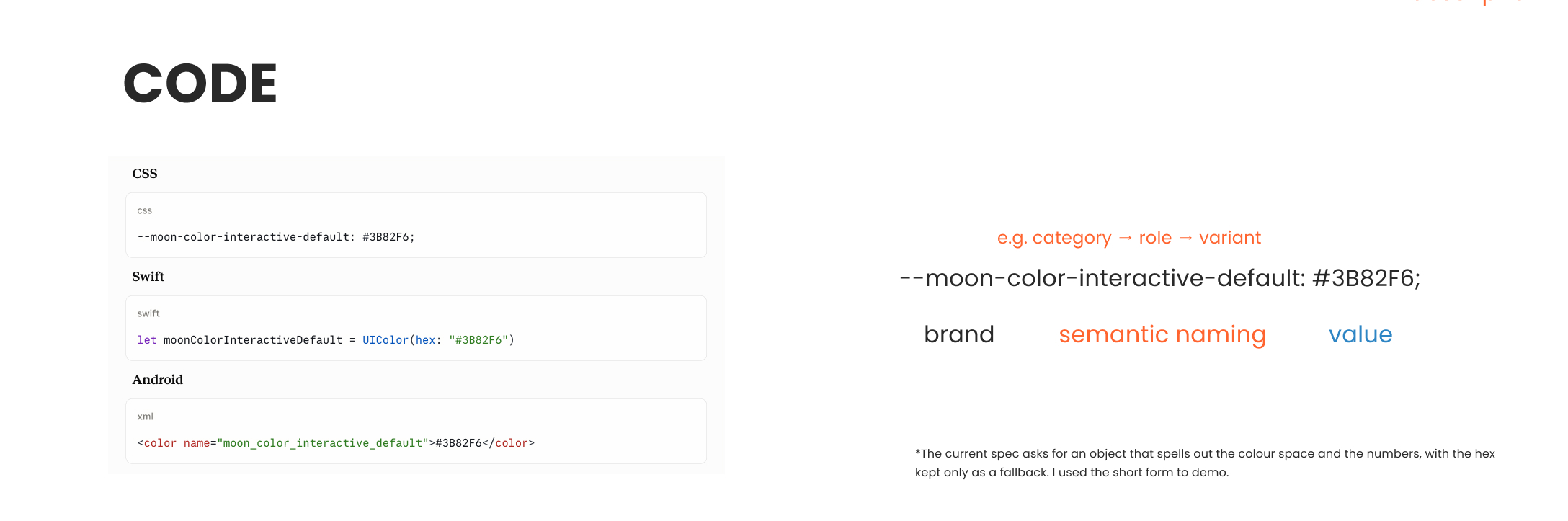
In Figma it is color/interactive/default. In the token file it nests as color, then interactive, then default. In CSS it joins up as --moon-color-interactive-default.
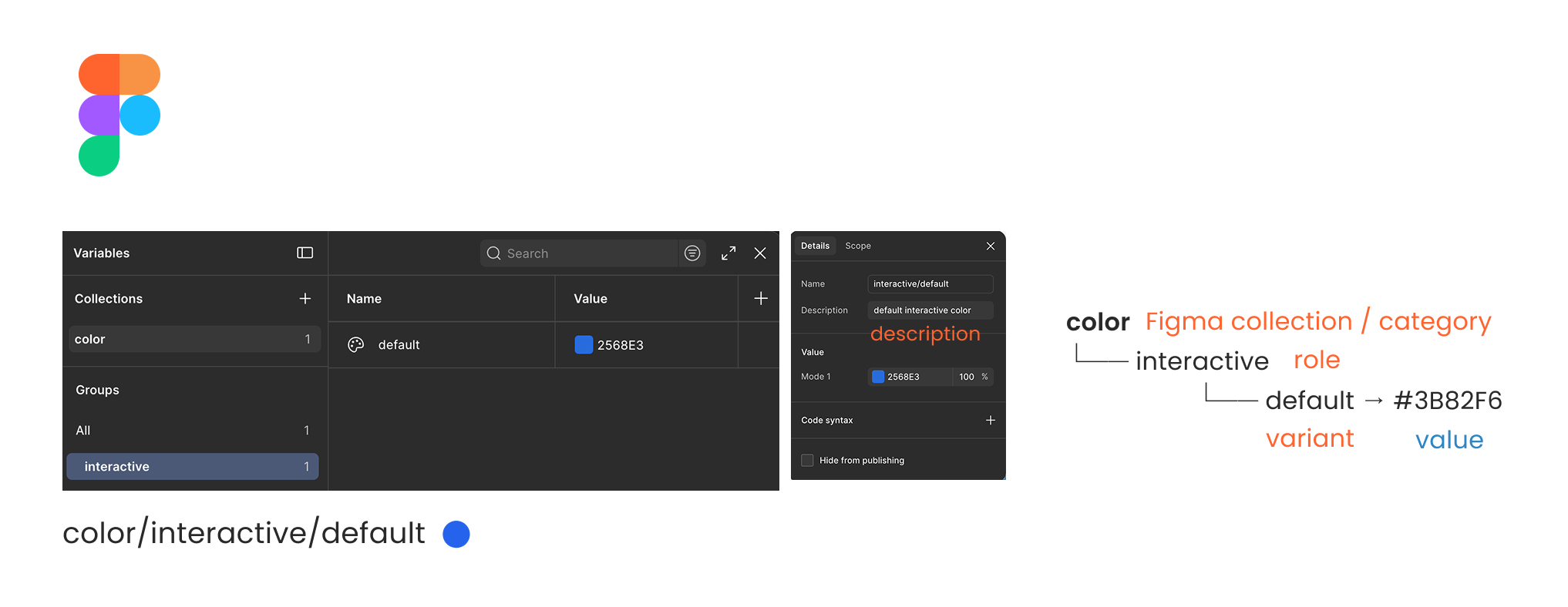
Figma uses slashes because it shows them to you as folders, the token file nests them as objects, and CSS joins them with hyphens. Nothing gets renamed on the way, the path is just written differently each time.
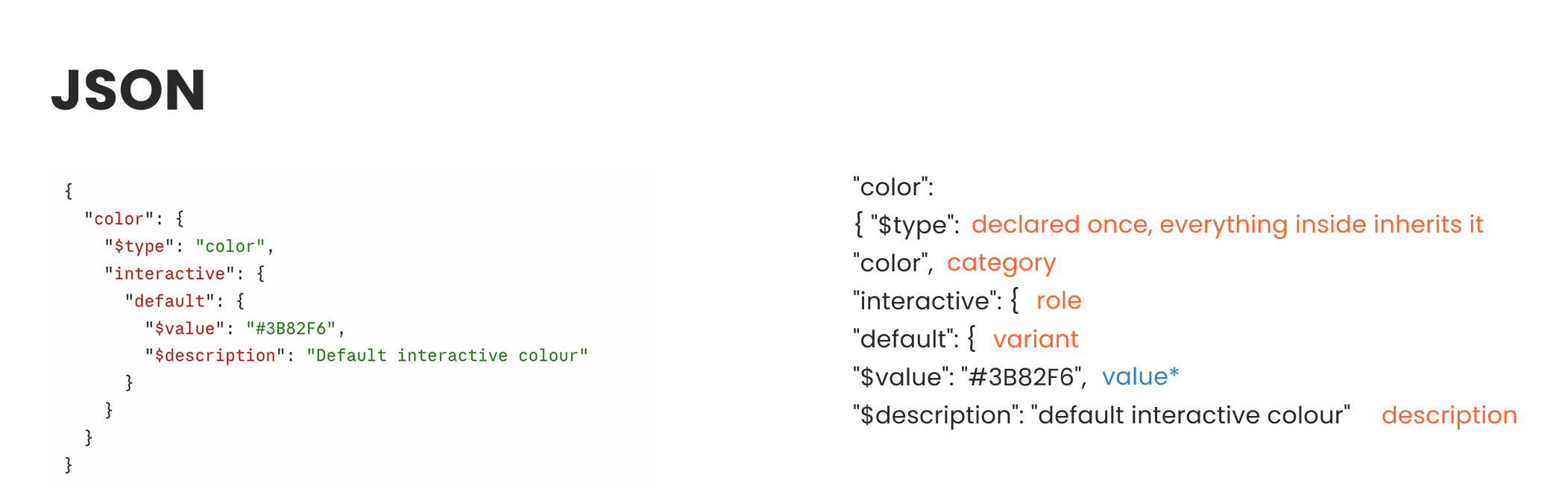
The prefix is the one piece that is not in the file at all. Your build tool adds it, which is why moon shows up in the CSS and nowhere in the JSON. From JSON, you can then translate into code. Very important: into any CSS, Swift, whatever is needed. The syntax changes; the value travels safely.
One field worth knowing: in the variable details panel, next to the value, Figma has Code syntax. That is where you can store the name a platform should use, and Dev Mode shows it to whoever is building. Some export tools pick it up, others let the build tool decide. Either way, it is the place to write the name down rather than keep it in someone's head.
Which direction it travels depends on the team. Some write the tokens in a file and import them into Figma; others build them in Figma and export. Both work, as long as you agree on one. My own view has shifted though: now that MCP can move things both ways, I would rather go code to Figma, and let the design file follow the source that actually ships.
The question that actually matters: naming!
Not where a name starts, but who is allowed to change it.
A rename is not a tidy-up; it breaks the design file and the code in the same moment. Agree on who names a new token, and treat renaming an old one as a change request rather than a Friday-afternoon job. Naming looks simple, but it takes time, serious time and serious thought; do it as a team, understand it as a team. This effort will be rewarded, trust me. Nothing more painful than changing a naming system down the road.
The naming rules, and there are almost none
A name cannot start with a dollar sign, because that belongs to the format itself, and it cannot contain a full stop or a curly brace, because both are busy when one token points at another.
Beyond that there is no official word order and no official vocabulary. What you will find instead are conventions from teams who have done this at scale, and several are worth copying, as long as you know you are copying a convention rather than following a rule.
One note on the colour value, since I used a plain hex above. The current spec asks for an object that spells out the colour space and the numbers, with the hex kept only as a fallback. I used the short form because it is readable and most tools still write it, but you will meet the longer one the moment you look this up.
Starts 2 October, last days to enrol
The design skills that make you AI agent-ready
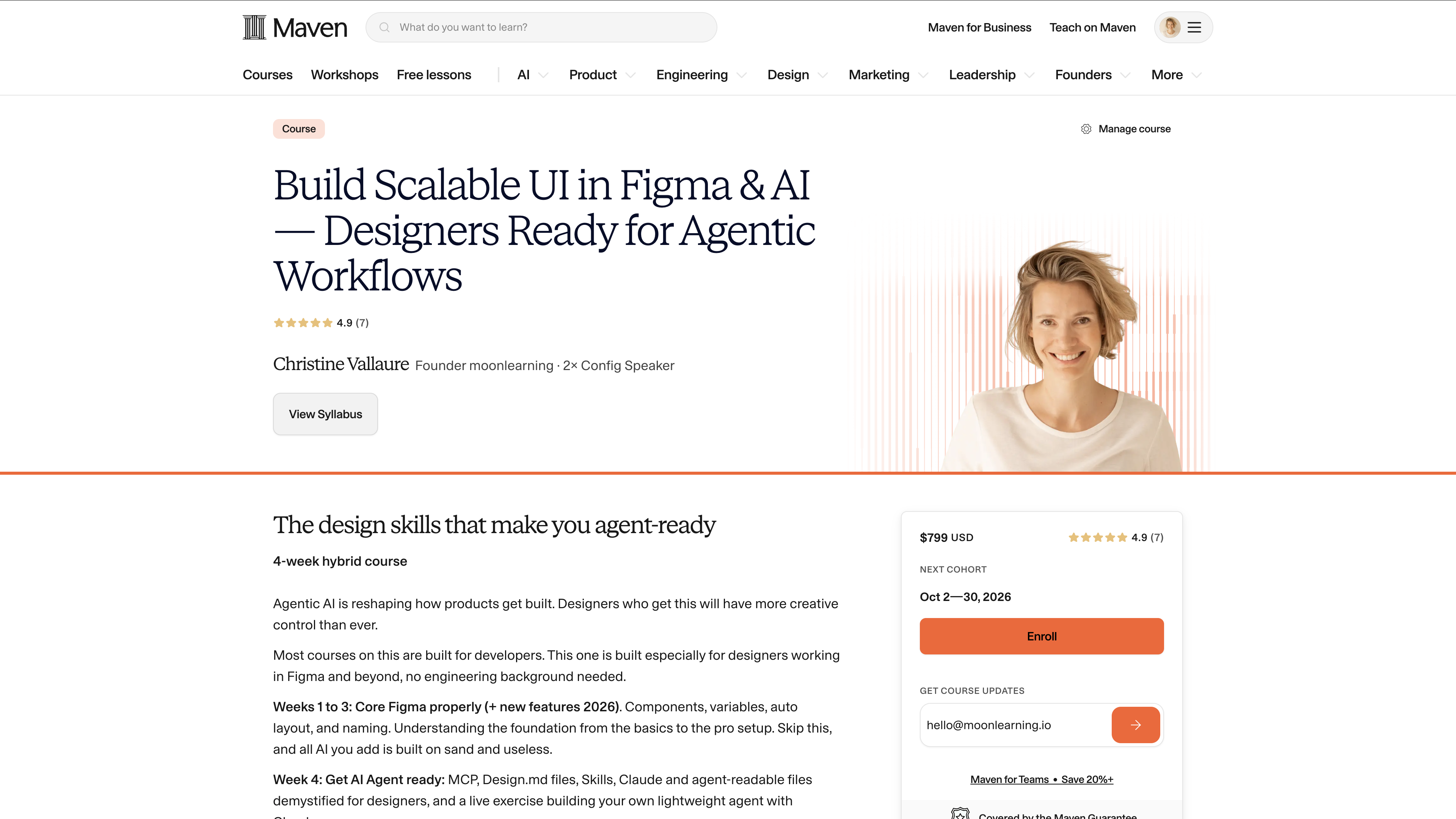
Build Scalable UI in Figma & AI: Design Systems Agents Can Actually Use runs from 2 to 30 October. Four weeks, hybrid: self-paced videos plus live sessions with me, and it is the long version of everything these short sessions only touch.
Weeks one to three are Figma done properly, with MCP from the start. Components, variants, variables aligned with tokens, auto layout and naming, from basics to pro. Skip that and every bit of AI you add is built on sand. Each week you move what you built between Figma and code.
Week four is AI design systems and prototyping in code, for designers. Contracts, DESIGN.md and other ways to give context, skills, why AI drifts, and how to prototype with real components, with Figma in the loop or without it.
Most AI workflows only go Figma to code. You will also go the other way, code to Figma, and learn which side should lead when.
This is the newest material I have, and the AI design system part is not in the moonlearning.io video library yet. It is moving too fast to record, so live is the only way to get it at the moment. You get a free Figma Edu seat, and you should bring a Claude Pro account.
Coming soon
A plugin that checks whether your Figma file is AI-ready
I am putting the last touches on a Figma plugin I built. It walks through your file step by step and shows you what an agent can read, what it cannot, and what to fix first. No code access needed, and it is written for designers, not for a build pipeline.
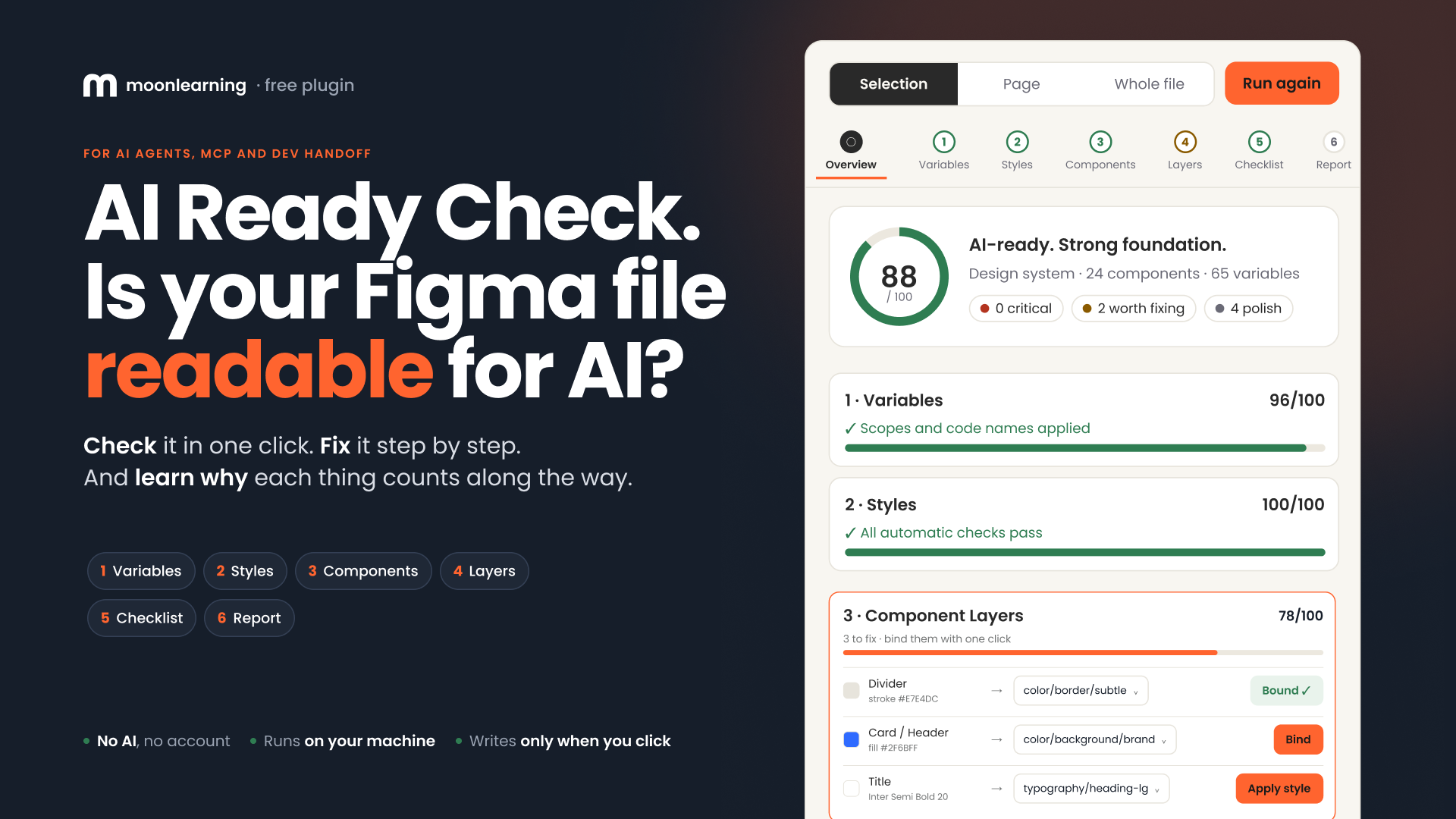
It goes into beta shortly and you will get free access via the newsletter. Hopefully next week; just very busy right now, but on it!
Actionable Figma and AI training for designers, individuals and teams.
Most designs break between idea and build. I teach the thinking, the tools, and the technicalities beneath the surface, plus which AI workflows earn their place.
See all video courses -->
See all live workshops -->
Team training -->

Video courses · Live workshops · Team training
The Solo, my book · LinkedIn · Past issues
You are getting this because you signed up at moonlearning.io.

Responses